Reddit Video Downloader — Download Videos With Audio Free in HD
Save any Reddit video instantly — With audio, no watermark, 100% free & unlimited

What is Reddit Video Downloader?
Understanding Reddit Videos & Why Download Them
Reddit is one of the internet's largest content platforms — millions of users share videos daily across thousands of subreddits. From breaking news and documentaries to viral clips and hilarious memes, Reddit's video ecosystem is incredibly diverse. But Reddit has a unique problem that frustrates downloaders: the native video player splits audio and video into separate streams using DASH (Dynamic Adaptive Streaming over HTTP), meaning most Reddit video downloads end up muted.
Our Reddit Video Downloader solves this completely. We automatically detect the separated audio and video streams from Reddit's servers, merge them seamlessly in the cloud, and provide a perfect single MP4 file with synchronized sound. No muted videos, no missing audio — just clean, complete downloads.
Why Download Reddit Videos?
- 🎬 Archive Important Content: Save breaking news, documentaries, educational videos before they're deleted or removed.
- 😂 Save Funny Moments: Build a personal collection of the funniest Reddit videos and memes for rewatching.
- 📚 Educational Content: Download tutorials, explanations, skill demonstrations for offline study and reference.
- 🔍 Research & Analysis: Creators download Reddit videos to study trends, engagement patterns, content strategies.
- 💬 Share Without Reddit: Send MP4 files directly to friends via WhatsApp, email, or messaging apps — no app needed.
- ✈️ Offline Viewing: Watch Reddit videos anywhere without internet — planes, commutes, low-signal areas.
- 📱 Cross-Platform Sharing: Use Reddit videos on YouTube, Instagram, TikTok, your blog (with proper attribution).
- 🎯 Content Curation: Keep videos organized for reference, inspiration, or professional purposes.
Reddit Video Specifications & Technical Details
Video Format Standards
| Specification | Value | Details |
|---|---|---|
| Video Resolution | 720p - 1080p | Most Reddit videos: 720p or 1080p |
| Aspect Ratio | 16:9 and 9:16 | Horizontal and vertical formats |
| Frame Rate | 24-60 FPS | Typically 30 FPS standard |
| Video Bitrate | 2-6 Mbps | Varies by original upload |
| Video Codec | H.264 or VP9 | Standard compression formats |
| Container Format | MP4 | Universal format, all devices |
| Audio Codec | AAC or MP3 | High-quality stereo audio |
| Audio Bitrate | 128-256 kbps | Clear, high-quality sound |
| Audio Channels | Stereo (2 channels) | Standard stereo format |
| Typical Duration | 15 seconds - 30 minutes | Highly variable, short to long |
| File Size (30 sec video) | 10-25 MB | Typical Reddit video |
| File Size (5 min video) | 50-150 MB | Typical medium-length video |
| Streaming Protocol | DASH (Dynamic Adaptive) | Reddit uses separate audio/video streams |
Why Reddit Videos Are Muted & How We Fix It
The Reddit DASH Problem
Reddit uses DASH (Dynamic Adaptive Streaming over HTTP) to stream videos efficiently. This protocol splits the video stream and audio stream into separate files. When you try to download a Reddit video using traditional methods, you get the video file but not the audio file — resulting in a muted video.
Our Reddit Video Downloader solves this by:
- Detecting Both Streams: Identifies both the video stream (v.redd.it) and the audio stream simultaneously
- Fetching Separately: Downloads both streams from Reddit's servers independently
- Merging in Cloud: Combines them seamlessly in our cloud infrastructure
- Syncing Audio & Video: Ensures perfect audio-video synchronization
- Delivering MP4: Provides a single, complete MP4 file with audio and video together
How to Download Reddit Videos — Complete Device Guide
💻 On Desktop/Laptop (Windows/Mac)
Step 1: Copy the Reddit Post Link
- Go to reddit.com in your web browser
- Find the post with the video you want to download
- Look for the Share button below the video
- Click "Share"
- Select "Copy Link"
- The Reddit post URL is now copied
- Format:
https://www.reddit.com/r/subreddit/comments/xxxxx/title/
- Format:
Step 2: Paste into SnapReelDownload
- Come to this page
- Click in the input box at the top
- Paste the Reddit link
- Windows: Ctrl + V
- Mac: Cmd + V
Step 3: Download With Audio
- Click the "Download" button
- Wait 3-10 seconds (our system merges audio and video streams)
- Choose your quality:
- HD (720p/1080p) — Best quality (recommended)
- SD (480p) — Smaller file size
- Click to download — complete MP4 with audio goes to your Downloads folder
Step 4: Access Your Video
- Windows: Press Windows key + E → Downloads → Find your video → Open with VLC or any media player
- Mac: Finder → Downloads → Double-click → Opens in QuickTime or default player
📱 On Android Phone
Step-by-Step Guide
- Open the Reddit app or reddit.com in your browser
- Find the video post you want to download
- Tap the Share button
- Select "Copy Link"
- Open Chrome or Firefox browser
- Go to SnapReelDownload.com/reddit
- Long-press in input box and select "Paste"
- Tap the "Download" button
- Wait 3-10 seconds
- Choose quality (HD recommended)
- Tap "Download" to confirm
- Video saves to your Downloads folder with audio included
Finding Your Video on Android
- Open Files app or Gallery
- Go to Downloads
- Find your Reddit video (will have audio now!)
- Tap to play or long-press to share
Pro Tips for Android
- 📱 Use MX Player or VLC for playback
- 📁 Create "Reddit Videos" folder
- ☁️ Backup to Google Drive
- 🎬 Edit in CapCut
📱 On iPhone (iOS)
Important: Use Safari, Not Chrome
⚠️ Always use Safari on iPhone. Chrome has iOS download limitations.
Step-by-Step Guide
- Open the Reddit app
- Find the video post
- Tap Share
- Select "Copy Link"
- Open Safari (not Chrome!)
- Go to SnapReelDownload.com/reddit
- Tap in input box → "Paste"
- Tap the "Download" button
- Wait 3-10 seconds
- Choose quality
- Tap "Download"
Save to Photos on iPhone
- Tap the blue download arrow (⬇️) in Safari's address bar
- Find your video in "Downloads"
- Tap and hold the video
- Select "Save Video"
- Video is now in your Photos app with audio!
iPhone Pro Tips
- 🔧 Always use Safari
- 📸 Save to Photos for easy access
- ☁️ Use iCloud backup
- 🎬 Edit with iMovie or CapCut
📱 On iPad
Follow the iPhone steps — iPadOS works identically.
Reddit Content Types & Download Support
✅ Native Reddit Videos (v.redd.it)
What: Videos uploaded directly to Reddit
Download: Works perfectly ✅ Audio included
Quality: Up to 1080p
✅ GIFs & Looping Videos
What: Animated GIFs from Reddit
Download: Works as MP4 video ✅
✅ External Video Links
What: Videos from YouTube, Streamable, etc. linked in Reddit posts
Download: Works for many services ✅
✅ Embedded Media
What: Videos embedded in Reddit posts
Download: Works great ✅
❌ Cannot Download: Account-Protected Videos
Why: Requires authentication
Advanced Features & Tips
🎵 Extract Audio from Reddit Videos
Need just the audio?
- Paste Reddit post link
- Select "Audio Only (MP3)"
- Download MP3 in seconds
📥 Batch Download Multiple Videos
Download several Reddit videos:
- Copy first post link → Download
- Copy second post link → Download
- Repeat as needed
📁 Organize Your Downloads
Folder structure:
- 📁 /Reddit_News
- 📁 /Reddit_Entertainment
- 📁 /Reddit_Educational
- 📁 /Reddit_Science
- 📁 /Reddit_Gaming
☁️ Cloud Backup
- ☁️ Google Drive
- ☁️ OneDrive
- ☁️ Dropbox
Troubleshooting: Common Issues & Solutions
❌ "Invalid Link" or "Video Not Found"
Possible causes:
- Post was deleted by user
- Post was removed by moderators
- Link is incomplete
- Video source unavailable
Solutions:
- ✅ Verify post still exists on Reddit
- ✅ Check post is not deleted/removed
- ✅ Copy link again from Reddit share menu
- ✅ Wait a few minutes and retry
❌ Download Still Muted (No Audio)
Causes: Rare, our system usually fixes this
Solutions:
- ✅ Re-download the video
- ✅ Try different quality option
- ✅ Verify original post has audio
❌ Download is Slow
Solutions:
- Check internet speed (need 1+ Mbps)
- Clear browser cache
- Close other downloads
- Try different browser
Reddit Video Downloader Comparison
| Feature | SnapReelDownload | Competitor A | Competitor B |
|---|---|---|---|
| Speed | 3-10 sec ✅ | 10-20 sec | 20-40 sec |
| Audio Fixed | ✅ Always | ⚠️ Sometimes | ❌ |
| 1080p Download | ✅ | ✅ | 720p only |
| 100% Free | ✅ | Limited | Freemium |
| No Login | ✅ | ✅ | ❌ |
| Mobile-Friendly | ✅ | ✅ | ⚠️ |
Comprehensive FAQ
Q: Will my Reddit video download include audio?
A: Yes! Our system automatically detects and merges the separated audio stream. Every download includes perfectly synced audio.
Q: Is this completely free?
A: Yes, 100% free with unlimited downloads. No signup, no subscriptions, no hidden costs.
Q: Do I need a Reddit account?
A: No account or login needed. Just paste a public post link and download.
Q: Why are Reddit videos normally muted?
A: Reddit uses DASH streaming which splits audio and video. Our tool fixes this automatically.
Q: What quality will I get?
A: Up to 1080p HD, depending on original upload quality.
Q: Works on iPhone without app?
A: Yes, Safari browser only, no app needed.
Q: Can I extract audio only?
A: Yes, select "Audio Only (MP3)" option.
Q: Is it legal to download Reddit videos?
A: For personal use — yes. For commercial use or republishing without permission — no.
Q: What if the video is from external source?
A: We support many external sources. If it doesn't work, the source may not be accessible.
Q: Can I download NSFW videos?
A: Yes, no account verification needed. All public Reddit videos are downloadable.
Conclusion
Downloading Reddit videos with audio is straightforward with SnapReelDownload. Whether you're saving news, documentaries, educational content, or funny memes, our tool handles it all perfectly — with audio included.
👉 Ready to download Reddit videos? Copy a Reddit post link, paste it above, and download in HD with audio. It's that simple.
No login. No muted videos. No limits. 100% Free. Audio always included.
Download Reddit Video Online — Free, fast, no watermark, no login. Works on Android, iPhone & PC.
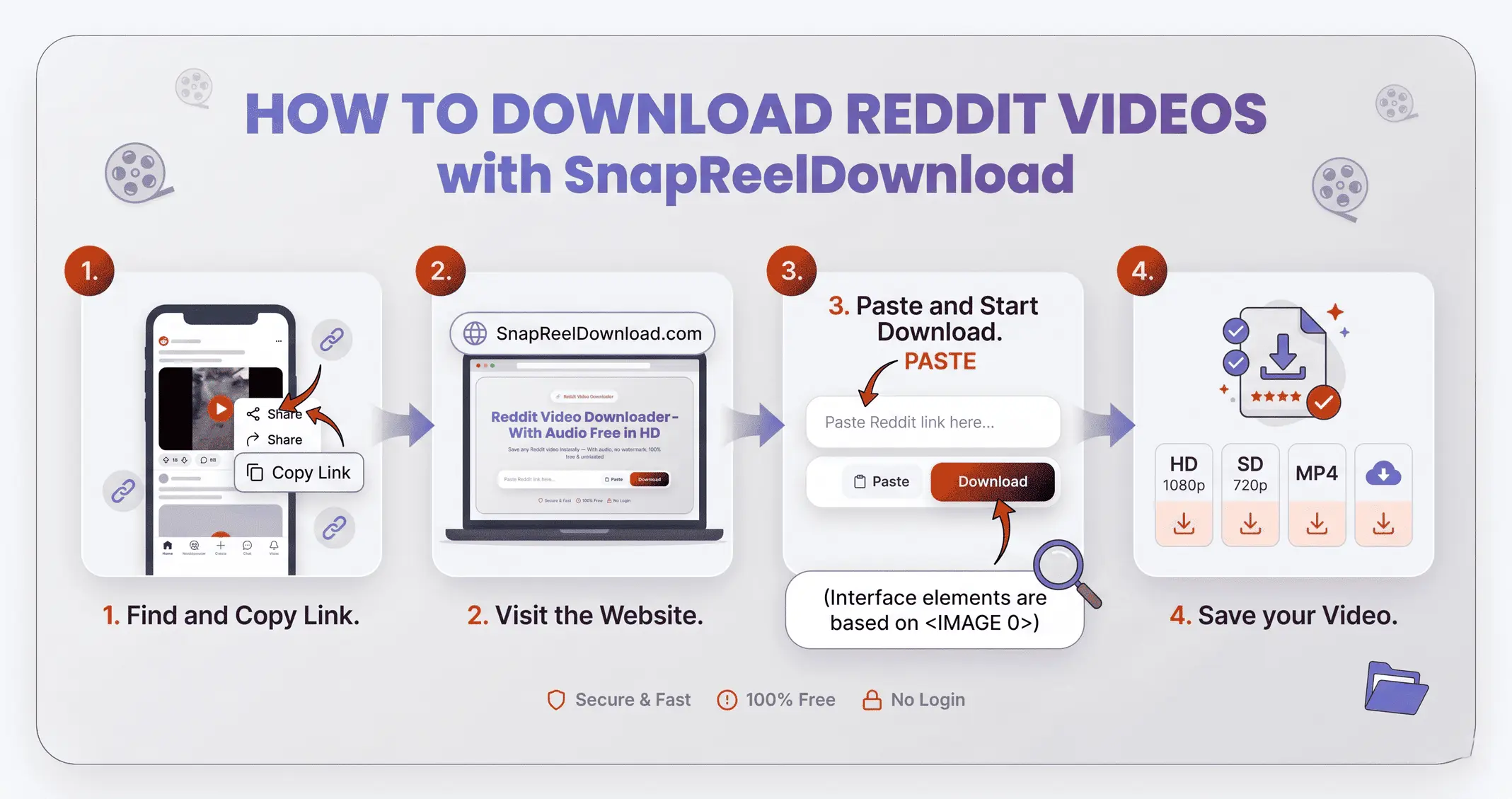
How to Download reddit video?
Step 1: Copy Link
Open Reddit and find the content. Tap Share and select Copy Link.
Step 2: Paste URL
Paste the copied link into the input box above.
Step 3: Download
Click Download and save the video to your device in HD.
Key Features of Reddit Video Downloader
- HD Quality: Download Reddit video in original high-definition quality.
- No Watermark: Get clean files without any platform logos or overlays.
- 100% Free: No hidden charges, no subscription, unlimited downloads forever.
- No Login Required: No Reddit account needed. Your account stays completely safe.
- All Devices: Works on Android, iPhone, iPad, Windows, Mac — any browser.
Why Use SnapReelDownload for Reddit?
When you want to save a video, you need a solution that is fast, reliable, and secure. Our downloader operates entirely in the cloud, meaning it won't slow down your device. Zero watermarks ensure that the video remains exactly as the creator uploaded it, providing the best possible viewing experience. Furthermore, we support the extraction of high-fidelity audio tracks (MP3/M4A), offering complete versatility for your media library.
How to Download Reddit Video on iPhone / iOS Devices
Downloading to an Apple device requires no third-party apps from the App Store. Simply open the Safari browser on your iPhone or iPad. Paste the Reddit link into our input field and tap 'Download.' Safari's native download manager will fetch the file. Once it finishes, tap the downward arrow near the address bar, select the video, and tap 'Save Video' to move it securely into your Photos app camera roll.
How to Save Reddit Video on Android Phones
For Android users (Samsung, Google Pixel, Xiaomi, etc.), the process is incredibly straightforward. Launch Google Chrome or your default browser. Paste the copied Reddit link and press the download button. The original MP4 video or audio file will automatically save to your device's 'Downloads' folder, meaning it will instantly appear in your system's gallery app, ready to be viewed completely offline or shared on WhatsApp.
Downloading to PC or Mac Desktop
Whether you're running Windows 11, Windows 10, macOS, or Linux, our web-tool functions perfectly. Open the Reddit website in a separate tab, copy the video link from the address bar, and paste it into our Reddit Video Downloader. Right-click the generated download button and select 'Save link as...' (or simply click it). It's the ideal method for collecting high-quality HD media for video editing projects or personal archives.
Other Downloader Tools
Download Format & Quality Comparison
| Format | Type | Quality | Best For |
|---|---|---|---|
| MP4 | Video | HD / 4K | Video with audio, editing |
| M4A | Audio Only | 320kbps | Music, podcasts, audio |
Device Compatibility Guide
| Device | Browser | Support | Speed |
|---|---|---|---|
| iPhone / iPad | Safari, Chrome | ✅ Full | ⚡ Fast |
| Android | Chrome, Firefox | ✅ Full | ⚡ Fast |
| Windows PC | Chrome, Firefox, Edge | ✅ Full | ⚡⚡ Fastest |
| Mac | Safari, Chrome | ✅ Full | ⚡⚡ Fastest |
All Supported Platforms
| Platform | Video | Audio | Max Quality |
|---|---|---|---|
| ✅ | ✅ | 1080p | |
| TikTok | ✅ | ✅ | 1080p |
| YouTube | ✅ | ✅ | 4K |
| ✅ | ✅ | 720p | |
| Twitter / X | ✅ | ✅ | 1080p |
| ✅ | — | 720p | |
| Snapchat | ✅ | ✅ | 480p |
Frequently Asked Questions
Is this Reddit Video Downloader completely free to use?
Do I need to sign up or create an account?
Can creators see that I downloaded their content?
Is it legal to download social media videos?
What video and audio formats can I download?
Does this downloader work on an iPhone or iPad?
How do I download videos on my Android phone?
Is downloading safe for my device? Will I get a virus?
Where are the downloaded videos saved on my PC or Mac?
Do you keep a copy of my downloaded files?
Disclaimer: SnapReelDownload is a personal tool for saving publicly available online content for offline viewing. We do not host any content and are not affiliated with Instagram, YouTube, TikTok, Snapchat, Facebook, or any social media platform. Please respect copyright laws and the terms of service of the respective platforms.